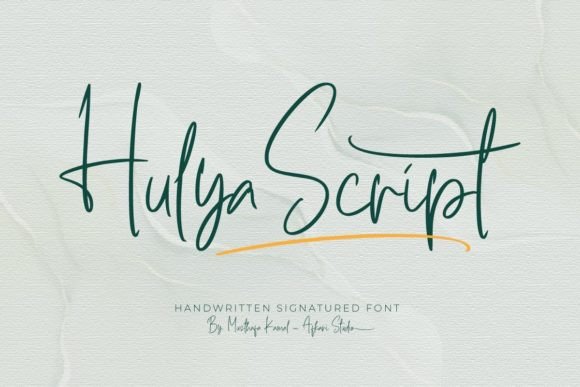
Hulya Script: A Web Designer’s Dream Typeface for Elegant Digital Branding
As a web designer, I'm always on the hunt for typefaces that bring both personality and performance to the table. When I first came across Hulya Script, I was immediately drawn to its elegant, flowing lines and soft calligraphic charm. I decided to test it out on a real project — a boutique coaching website redesign — and I’ve been impressed with how it elevates the brand’s digital presence while maintaining readability and design harmony.
Bringing Elegance to the Hero Section
The first place I used Hulya Script was in the hero section of the homepage. The client wanted a warm, inviting tone that felt personal yet professional — something that would stand out without overwhelming the user. I placed Hulya Script as the headline over a soft lifestyle image with a light overlay. The result? Absolutely stunning.
The font’s natural flow and subtle bounce gave the hero area a handcrafted feel, which perfectly aligned with the coaching brand’s values of authenticity and connection. I adjusted the letter spacing slightly for better screen legibility and paired it with a clean sans serif for the subheading. The contrast worked beautifully, drawing the eye while keeping the layout balanced.
Mobile Responsiveness and Readability
One of the biggest concerns with decorative fonts is how they perform on mobile devices. I was curious how Hulya Script would hold up on smaller screens. After testing it across multiple devices, I found that it scaled well when used at a reasonable size — especially in headlines and section titles.
That said, I wouldn’t recommend using it for small buttons or navigation labels. Its delicate strokes and swashes can become lost or even pixelated if scaled too small. For best results, I suggest using Hulya Script in display sizes only — think headlines, hero text, and short brand statements. It’s not ideal for long paragraphs or interface-heavy areas where clarity is key.
Font Pairing for a Balanced Web Layout
When integrating Hulya Script into the coaching website, I paired it with a modern sans serif font for body copy and secondary text. This combination created a nice visual rhythm — the script brought warmth and elegance, while the sans serif grounded the design with clean readability.
This kind of pairing is perfect for landing pages, portfolio headers, or boutique store banners. For a more editorial feel, you could also pair it with a soft serif font. Just remember to keep the supporting typefaces simple to let Hulya Script shine where it counts — in your brand’s visual storytelling.
Using Hulya Script in Different Web Elements
I also tested Hulya Script in other areas of the site, including a call-to-action section and a testimonial banner. In the CTA, I used it for a short phrase like “Start Your Journey” over a pastel background. It added a soft, inspirational touch that matched the brand’s tone.
In the testimonial section, I used it sparingly for quote marks and the client’s name, which helped create a sense of personal connection. It didn’t work quite as well in a full quote block — again, due to its decorative nature — but as an accent element, it was perfect.
For a digital brand kit I designed alongside the website, I used Hulya Script in the logo mockup and header graphics. The font gave the brand assets a premium, hand-crafted feel that elevated the overall design without feeling forced.
Performance and Web Font Support
From a technical standpoint, Hulya Script comes with standard web font formats like WOFF and TTF, making it easy to integrate into modern websites. I loaded it via a local font stack to avoid relying on third-party CDNs, which helped maintain fast load times.
It’s important to note that while Hulya Script is beautiful, it’s still a display font — meaning it’s best used sparingly to maintain performance and readability. I recommend using it only where it adds the most visual impact, rather than across every page element.
Also, be sure to check for multilingual support and licensing if you're using it on client sites or international brands. The font includes a range of alternate characters and ligatures, which can be a nice touch for customizing headlines or logo text.