Ginghart Script: A Retro-Inspired Typeface for Stylish Branding Projects
First Impressions: A Fresh Start on a Bakery Brand Board
I opened a new brand board for a local artisan bakery last week and immediately reached for Ginghart Script. I’ve been testing it in real-world design scenarios, from logo drafts to packaging mockups, and I wanted to see how it would perform in a more delicate, handcrafted setting. The font loaded quickly, and right away I noticed its charming, slightly bouncy baseline and medium stroke contrast. It gave the brand board a sense of warmth and personality that many modern script fonts lack.
Design Personality: Retro Meets Versatility
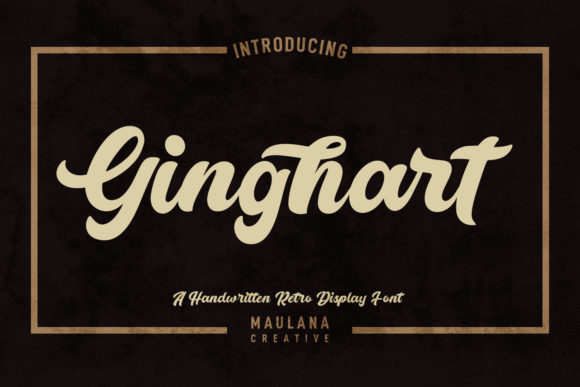
Ginghart Script is a fancy and retro-styled script font with a playful yet refined aesthetic. It features soft swashes, elegant ligatures, and a variety of alternate characters that let you customize the look for different design applications. The medium contrast strokes make it readable at larger sizes while still maintaining that classic script feel. Whether I was designing a logo concept or drafting a business card layout, the font consistently delivered a sense of nostalgia and creativity.
Its retro charm reminded me of 1950s diner signs and vintage packaging labels, but with a cleaner, more modern structure that keeps it from feeling outdated. That balance is key when working with script fonts — too ornate and it becomes a distraction, too minimal and it loses character. Ginghart Script hits a sweet spot between elegance and approachability.
Logo Design and Brand Identity Use
For the bakery project, I tested Ginghart Script as the primary logo typeface. It worked beautifully as a standalone headline font, especially in a logotype with a simple color palette and hand-drawn icons. The ligatures added a fluidity that made the wordmark feel custom-made. I also tried it alongside a clean sans serif for subheadings, and the contrast was visually pleasing without being jarring.
In a brand identity system, Ginghart Script shines as a display font or accent typeface. It’s not ideal for long body text or small-size applications, but as a logo or headline font, it brings a strong personality that helps brands stand out. I used it in a brand board mockup and found that it paired well with both serif and sans serif fonts, giving the design a layered, intentional feel.
Packaging and Print Design Performance
One of the most telling tests was placing Ginghart Script on a packaging mockup for the bakery’s cookie boxes. At a larger size, the font looked crisp and elegant, with enough flair to feel premium without overdoing it. I used the swash alternates on the back label for a tagline and got a nice visual lift that made the design feel more bespoke.
However, when scaled down for a smaller label or business card, some of the finer strokes began to lose clarity. This is a common issue with script fonts, but it’s worth noting: Ginghart Script is best used where it can breathe. If you’re considering it for product packaging, make sure it’s reserved for headlines, brand names, or short phrases rather than detailed ingredient lists or fine print.
Web and Social Media Adaptability
I also tested Ginghart Script in a few web design contexts — specifically, a homepage hero section and a branded Instagram post layout. On screen, the font held up well, especially in web-safe formats with proper anti-aliasing. As a headline font on a hero section, it gave the site a boutique, artisanal feel that matched the bakery’s brand voice.
On social media, it worked best in static graphics where the text wasn’t too small. I used it in a quote-style Instagram post and found that the script’s natural flow made it more eye-catching than standard headline fonts. However, for stories or mobile-first designs, I’d recommend using it sparingly — again, due to readability concerns on smaller screens.
Font Features and Practical Design Tips
One of the standout features of Ginghart Script is its character set. It includes ligatures, swashes, and alternates that let you tailor the look to your project. I found the stylistic alternates particularly useful when designing logo variations or when trying to match the font with a specific brand mood.
It also supports multiple file formats, including webfont versions, which makes it a solid choice for both print and digital branding. However, as with any premium font, it’s important to check the licensing terms before using it in client work or commercial design assets. Make sure you have the rights to use it in packaging, merchandise, or templates if that’s part of your deliverables.
When Ginghart Script Isn’t the Right Fit
While Ginghart Script is a versatile and visually appealing font, it’s not a one-size-fits-all solution. It’s best suited for display use — think logos, headlines, posters, and social media graphics. It’s not ideal for long-form editorial design, body copy, or formal corporate branding where clarity and neutrality are key.
Also, if your project requires a highly legible font at small sizes — such as in product manuals, signage systems, or data-heavy reports — Ginghart Script may not be the best choice. Its decorative nature can become a drawback when readability is the top priority.
Final Thoughts: A Designer’s Go-To Script Font
After testing Ginghart Script across a full branding project — from logo design to packaging, business cards, and digital layouts — I can confidently say it’s a strong contender in the script font category. Its retro-inspired style, combined with thoughtful design details, makes it a joy to work with for creative and boutique-style brands.
If you’re a designer, freelancer, or small business owner looking to add a touch of elegance and personality to your next project, Ginghart Script is definitely worth a try. Just remember to test it in context, pair it thoughtfully with supporting fonts, and always verify the licensing before final delivery.