Crafting with Camellina Script: A Beautiful Script Font for Handmade Labels, Invitations & More
As a crafter and small shop owner, I’m always on the lookout for fonts that blend elegance with practicality. Camellina Script is one of those rare typefaces that instantly caught my eye. It’s a clean, beautiful script font that brings a touch of sophistication to any project without sacrificing readability. Whether you're creating handmade labels, printable invitations, or SVG designs for Cricut or Silhouette, this font is a must-have in your font library.
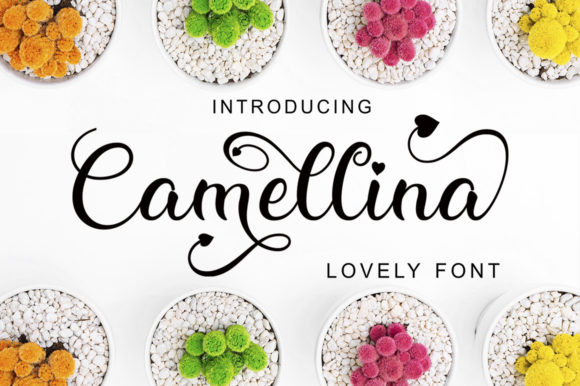
Camellina Script stands out with its charming swashes and irregular baselines that add visual interest without overwhelming the design. It’s not overly ornate, which makes it perfect for crafters who want a modern script that still feels personal and handmade. The font is PUA encoded, which means all the special characters and glyphs are easily accessible in design programs like Adobe Illustrator, Canva, and Silhouette Studio. This is a huge plus when you're working on intricate designs that need a polished, professional touch.
Perfect for Handmade Product Labels and Stickers
If you sell candles, bath products, or artisanal food items, your labels need to look both professional and approachable. Camellina Script works beautifully for brand names, product titles, and short descriptors. The irregular baseline adds a whimsical charm that appeals to customers looking for small-batch, handmade goods. I’ve used it for candle jar labels and boutique soap tags, and it always elevates the packaging without making it hard to read.
When working with small labels or stickers, it’s important to use the font at a legible size. Camellina Script shines best in titles and short phrases, so it’s ideal for product names or taglines rather than long paragraphs. Just make sure to preview your design at actual size—especially for cutting machines like Cricut or Silhouette—to ensure the delicate swashes don’t interfere with readability or cut lines.
Wedding Invitations, Greeting Cards & Stationery Designs
One of my favorite uses for Camellina Script is in wedding stationery. From save-the-dates to thank-you cards, this font brings a romantic, elegant feel that couples love. It’s especially effective for names, event titles, and special messages. Pair it with a simple sans serif font like Montserrat or Lato for body text, and you’ve got a classic, cohesive design that looks professionally done.
For greeting cards and planner inserts, Camellina Script adds a hand-lettered charm that feels personal and intentional. I often use it for seasonal cards—think Valentine’s Day, Mother’s Day, or holiday greetings. It also works well for printable wall art, especially when paired with botanical illustrations or minimalist quotes.
Designing with Camellina Script for Digital and Physical Merchandise
This font isn’t just for printables. Camellina Script works well in digital downloads like Canva templates, planner pages, and social media graphics. Its clean lines and elegant curves make it versatile for both web and print use. When designing for digital products, I recommend using it in headers or quote graphics where it can stand out without being too busy.
For physical merchandise like mugs, tote bags, or t-shirts, Camellina Script is a great choice for short phrases or names. I’ve used it on boutique tags, farmhouse signs, and even seasonal holiday packaging. The font’s irregular baseline adds a unique character that makes each product feel more personal and thoughtfully designed.
Font Pairing Tips for a Polished Look
Camellina Script is expressive enough to stand on its own but also pairs beautifully with other fonts for a balanced design. For a modern, minimalist look, try pairing it with a clean sans serif like Open Sans or Raleway. If you’re going for a vintage or rustic vibe, a distressed serif or a handwritten font can complement it well.
When working on layered SVG files or layered digital designs, using Camellina Script as the main headline and a bolder, simpler font underneath adds depth and visual hierarchy. This is especially effective for wedding welcome boards, boutique packaging, and seasonal signs where you want to draw attention to a specific phrase or name.
What You Should Know About Licensing and File Formats
As a small business owner or Etsy seller, it’s important to use fonts that allow for commercial use. Camellina Script typically comes with a license that permits use in physical products, digital downloads, and client work—always double-check the specific license included with your purchase. This gives you peace of mind when creating products for sale or offering design services to clients.
The font usually includes multiple file formats like OTF and TTF, making it compatible with most design software and cutting machines. Many versions also include stylistic alternates, ligatures, and swashes that let you customize the look of your text. These features are especially useful when designing logos, social media graphics, or personalized gifts.
Final Thoughts: Why Camellina Script Belongs in Your Font Collection
If you're a crafter, designer, or small business owner who values both beauty and usability, Camellina Script is a font you’ll reach for again and again. It’s versatile enough for a wide range of projects—from product labels to wedding invitations—while maintaining a unique, elegant style. Its readability, PUA encoding, and commercial licensing make it a practical choice for both digital and physical products.
Whether you're designing a new line of greeting cards, creating SVG files for Cricut, or printing custom signage for your booth, Camellina Script brings a handmade charm that resonates with customers. It’s more than just a script font—it’s a creative tool that helps you build a cohesive, professional brand identity while staying true to your craft.